Building a Calories Advisor App with Streamlit and Google Gemini Vision API
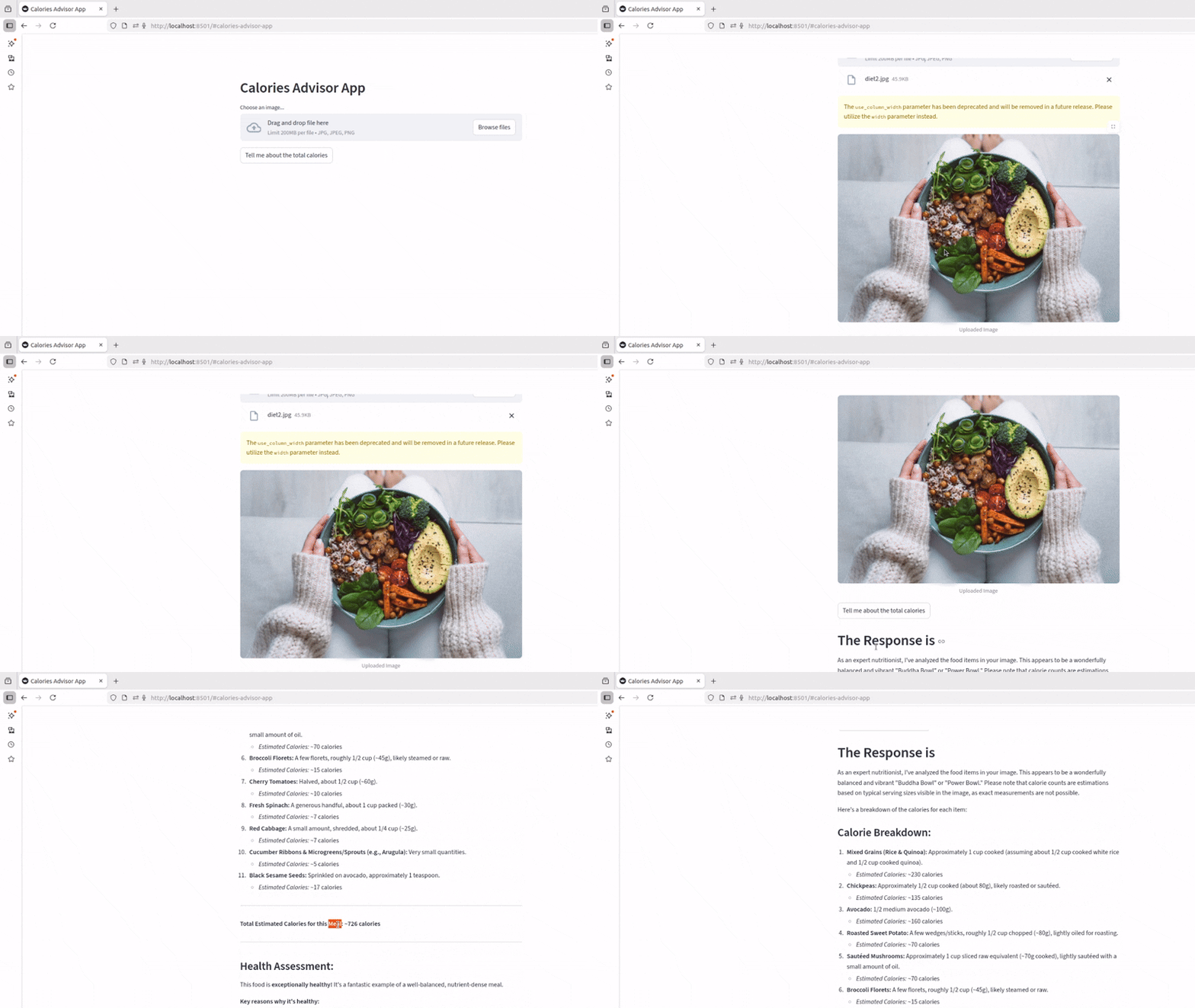
Imagine pointing your phone camera at a plate of food and instantly getting a full nutritional breakdown. That's exactly what we're building — an AI nutritionist app powered by Google Gemini Vision and Streamlit.
Upload a food image, and the app returns: identified items, estimated calories per item, total calorie count, and a health assessment.
What You'll Build

A Streamlit web app that:
- Accepts JPG/PNG food images via drag-and-drop
- Sends the image to Gemini 2.5 Flash with a structured prompt
- Displays an itemised calorie breakdown
- Gives a health verdict on the meal
Project Structure
nutritionist_app/
├── venv/
├── app.py
├── requirements.txt
└── .env
Setup
1. Create virtual environment
python -m venv venv
source venv/bin/activate        # macOS/Linux
venv\Scripts\activate           # Windows
2. Install dependencies
pip install streamlit google-generativeai python-dotenv# requirements.txt
streamlit
google-generativeai
python-dotenv3. Get your Gemini API key
Go to aistudio.google.com → Get API key → Create API key.
# .env
GOOGLE_API_KEY=your_api_key_here
The App
# app.py
import streamlit as st
import google.generativeai as genai
from PIL import Image
import os
from dotenv import load_dotenv

load_dotenv()
genai.configure(api_key=os.getenv("GOOGLE_API_KEY"))


def get_gemini_response(image_data: list, prompt: str) -> str:
    model = genai.GenerativeModel("gemini-2.5-flash")
    response = model.generate_content([prompt, image_data[0]])
    return response.text


def prepare_image(uploaded_file) -> list:
    if uploaded_file is None:
        raise FileNotFoundError("No file uploaded")
    return [
        {
            "mime_type": uploaded_file.type,
            "data": uploaded_file.getvalue(),
        }
    ]


PROMPT = """
You are an expert nutritionist. Analyse the food items in the image and provide:

1. A list of every food item visible
2. Estimated calories for each item in this format:
   - Item name — X calories
3. Total estimated calories
4. A brief health assessment (is this a balanced meal?)

Be specific and practical. If you can't identify something clearly, give a reasonable estimate.
"""

# ── UI ──────────────────────────────────────────────────────────────────────

st.set_page_config(page_title="AI Calories Advisor", page_icon="🥗")
st.title("🥗 AI Calories Advisor")
st.write("Upload a photo of your meal and get an instant nutritional breakdown.")

uploaded_file = st.file_uploader(
    "Choose a food image",
    type=["jpg", "jpeg", "png"]
)

if uploaded_file:
    image = Image.open(uploaded_file)
    st.image(image, caption="Your meal", use_container_width=True)

if st.button("Analyse Calories", type="primary"):
    if uploaded_file is None:
        st.warning("Please upload an image first.")
    else:
        with st.spinner("Analysing your meal..."):
            image_data = prepare_image(uploaded_file)
            response = get_gemini_response(image_data, PROMPT)

        st.subheader("📊 Nutritional Analysis")
        st.markdown(response)
Run It
streamlit run app.pyOpen http://localhost:8501, upload a food photo, and click Analyse Calories.
Example Output
Upload a photo of a burger and fries, and you'll get something like:
Food Items Identified:
- Beef burger (with bun) — 550 calories
- Cheddar cheese slice — 80 calories
- Lettuce & tomato — 15 calories
- French fries (medium) — 365 calories
- Ketchup (2 tbsp) — 30 calories

Total Estimated Calories: ~1,040 calories

Health Assessment:
This is a high-calorie meal with significant saturated fat from
the cheese and beef. It's low in fibre and micronutrients.
Consider swapping fries for a side salad to improve the
nutritional balance.
Prompt Engineering Tips
The quality of your prompt directly determines the quality of the output. A few principles:
Be specific about format:
# ❌ Vague
"Tell me about the calories in this food"

# ✅ Structured
"List each food item with calories in the format: - Item — X cal"
Set the persona:
"You are an expert nutritionist with 20 years of clinical experience..."Request reasoning:
"...and explain your reasoning for the calorie estimates"Enhancements to Try
- Macro breakdown — protein, carbs, fat per item
- Meal history — store analyses in a database
- Charts — visualise calories with
st.bar_chart - Camera input — use
st.camera_inputfor live capture - Export — download the analysis as a PDF
This project is a great portfolio piece showing that you can integrate AI APIs into real user-facing products — which is exactly the kind of skill companies are hiring for right now.